If you are looking for a complete CCTV Power Supply Guide, you are in the right place. At IT Security India, we help thousands of customers across India choose the right power supply. It supports their surveillance systems. We offer the best price, guaranteed. A good CCTV system is only as reliable as its power source. Whether you secure a home, office, or factory, you must understand CCTV power supplies. This is the first step to building a system that will not let you down. Call IT Security India today at 999 972 5655. Get expert guidance tailored to your needs.
What is a CCTV Power Supply?
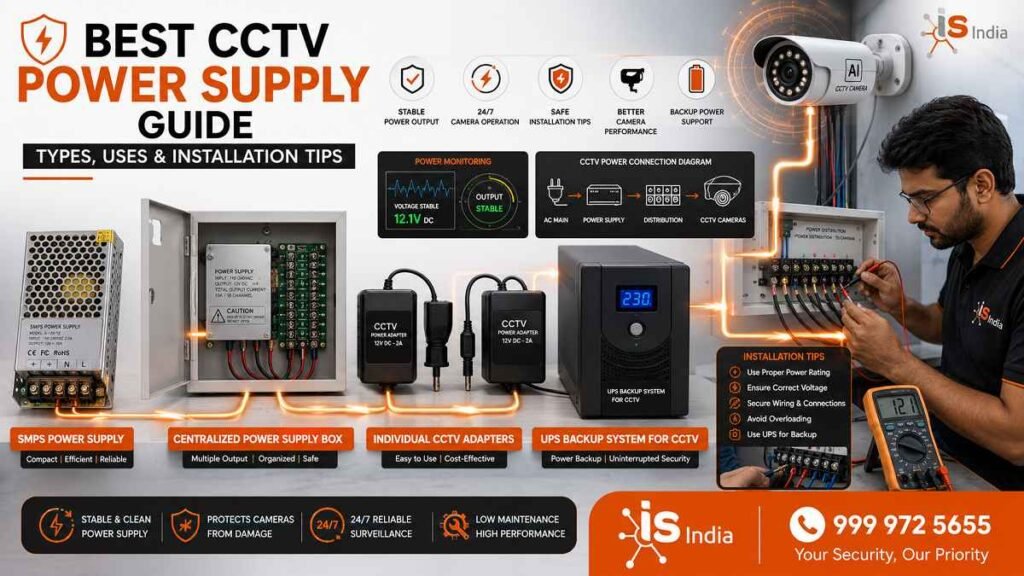
A CCTV power supply is a device that gives steady, regulated power. It powers cameras, DVRs, NVRs, and related accessories. Without a dependable power source, even the most advanced camera becomes useless.
Importance of Stable Power for CCTV Cameras
Stable power is not optional — it is essential. An unstable or mismatched power supply can cause cameras to reboot at random. It can also lead to poor-quality footage. In some cases, cameras may fail during critical moments. According to security experts, video feeds sometimes cut out for no clear reason.
Loose connections often cause this. Power fluctuations can also cause this. If left unfixed, these issues can cause false motion alerts and weaken your entire security system.
How CCTV Power Supplies Work
An AC power supply for cameras converts the high-voltage AC from the wall outlet into less powerful DC. Cameras require the DC voltage. Its power is determined by the formula P = I × V (Power = Current × Voltage). For instance, an image camera operating at 12V and 0.5A will require 6 watts of power. The power supply should be calibrated to meet the needs of all connected devices and cameras.
Different Types of CCTV Power Supplies
Choosing the right power supply depends on your system size, camera locations, and budget.
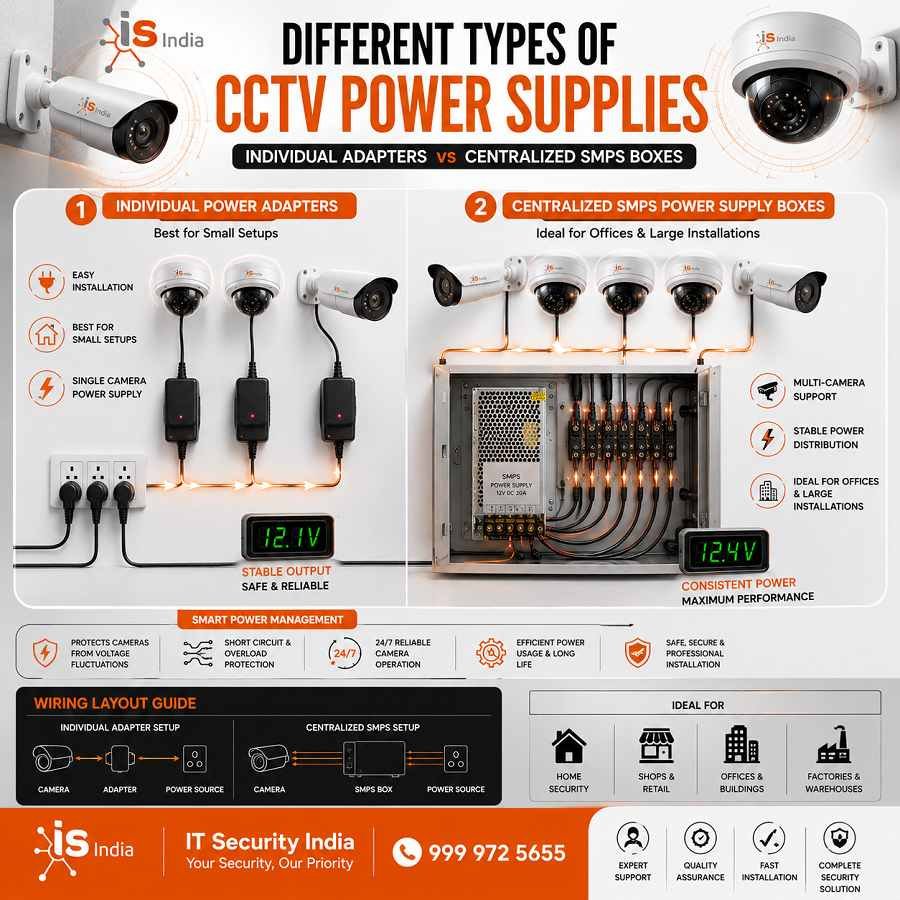
Individual Power Adapters
These are plug-in adapters that power a single camera directly from a wall socket. They are the most common solution for small setups. Most security cameras use 12V DC. This makes these adapters easy to find and affordable. However, some cameras need more power.
For example, PTZ (pan-tilt-zoom) models may need a 24V AC adapter. Always check the camera specs before buying an adapter. Confirm the exact voltage and amperage it needs.
Centralized SMPS Power Supply Boxes
For multi-camera installations, a central Switched Mode Power Supply (SMPS) box is the best choice. These units supply power to multiple cameras from a single source. This improves cable management and makes troubleshooting much easier. For example, a 16-camera system with each camera using 6W requires a power supply of at least 96W. IT Security India stocks many SMPS power supply boxes for 4, 8, 16, and more camera channels.
We offer some of the best prices in India. Call us at 999 972 5655 to find the right unit for your system.
Choosing the Right Power Supply for CCTV Cameras
Making the wrong choice here leads to costly repairs. Here is what you need to know.
Understanding Voltage and Ampere Requirements
Amperage and voltage must be precisely in line with your camera’s specifications. Most CCTV cameras run on 12V DC power; certain models also require 24V AC and PoE (Power over Ethernet). An inconsistency could result in instability or even permanent hardware damage. On the amperage front, if a camera requires 2A, it’s safe to use a 5A supply. The camera will draw the amount it requires. But using a 1A supply with a 2A camera can cause it to overheat and eventually fail.
Selecting Power Supplies for Multiple Cameras
For multi-camera systems, add the current requirements of all connected cameras. Add a safety margin for startup demand and future expansion. A centralized power supply not only improves cable management but also simplifies maintenance. IT Security India recommends buying a power supply with a bit more capacity than you need now. This makes it easier to add cameras later. You will not need to replace your whole power system.
Common CCTV Power Supply Problems
Knowing the warning signs can save your system before a total failure occurs.
Camera Flickering or No Video Signal
Flickering is among the most commonly reported CCTV issues. Most often, the reason is a power source that doesn’t match the camera’s power or milliamp requirements. For instance, using a 200 mA adapter on a camera that requires 500 mA will result in flickering. Other reasons include broken cable connections, loose or damaged connectors, and interference with nearby fluorescent or wireless devices. Always test the camera with a known power supply to pinpoint the issue.
Power Failure and Voltage Drop Issues
Flickering is among the most frequently reported problems with CCTV. The most frequent reason is that the power supply doesn’t match the camera’s milliamp or voltage demands. For instance, using a 200 mA adapter with a camera that requires 500 mA will result in flickering. Other reasons include broken cords or connectors, or interference from nearby fluorescent or wireless devices. Always test your camera using an approved power supply to pinpoint the issue.
CCTV Power Supply Installation Tips
Proper Cable Management and Wiring
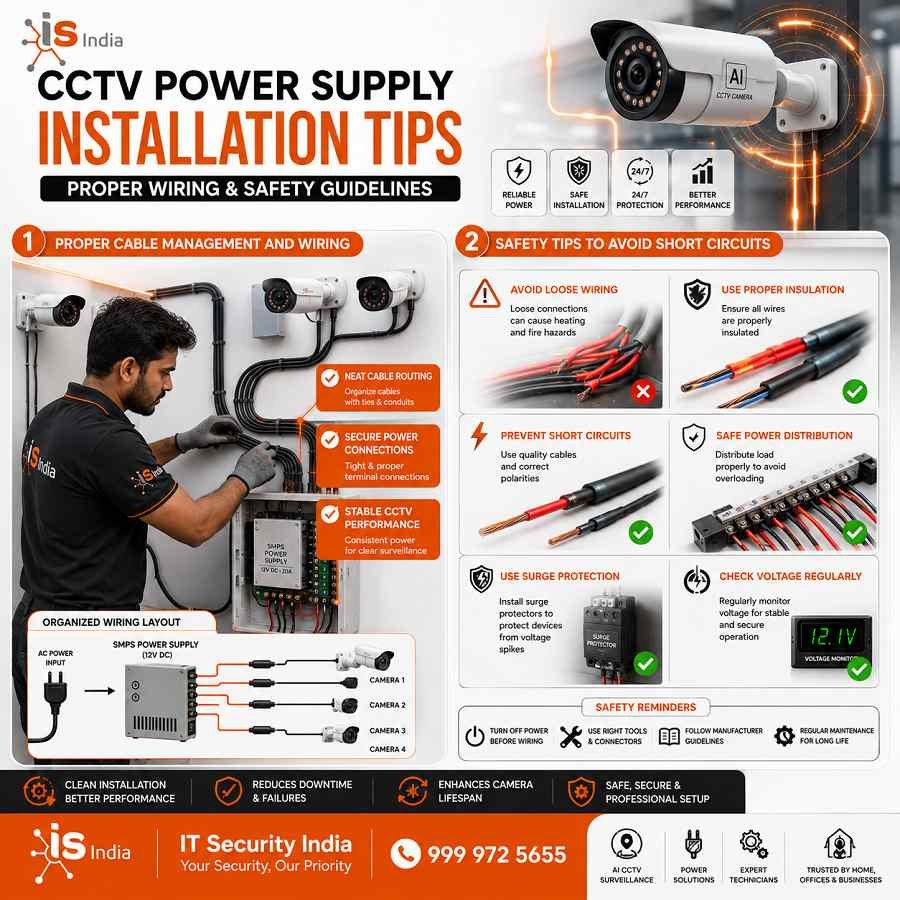
Always use clips or cable ties to keep wires organized and free of tangles. Be sure to check the polarity of the wires when connecting the negative and positive terminals. If you connect them the wrong way, it can damage the cameras. After installation, use an electronic voltage tester to check for a large voltage drop. Do this when you apply the load. Install the power source in a safe, dry, and well-ventilated area. Keep it away from extreme heat and humidity.
Safety Tips to Avoid Short Circuits
Do not use cheap or common power sources. They usually fail to deliver a stable voltage output. Consider investing in surge protectors or a UPS (Uninterruptible Power Supply). It protects cameras and NVRs against voltage surges. When setting up outdoors, choose enclosures with weatherproofing to shield the power connection from moisture and rain. Follow the manufacturer’s recommendations to avoid invalidating warranties and ensure the best performance.
Benefits of Using High-Quality CCTV Power Supplies
Improved Camera Performance and Stability
A certified, high-quality power supply delivers steady voltage to keep cameras running well, day and night. Cameras with enough power have better image quality, more reliable infrared night vision, and fewer system errors. Poor power supply choices can cause devices to reset again and again.
They can also weaken infrared performance at night. These issues can ruin your security system.
Longer Lifespan of CCTV Systems
Investing in a high-quality power supply helps your recording equipment and cameras last longer. A reliable power supply can prevent small damage from voltage fluctuations. It reduces the need for repair and replacement costs. Make sure that power supplies are rated with UL (Underwriters Laboratories) or CE (Conformité Européenne) certifications. These marks prove they were checked for safety and reliability.
Maintenance Tips for CCTV Power Supplies
Regular Inspection and Cleaning
Check the power source units once every couple of months. Dust build-up acts as insulation and can cause parts to heat up. Clean the vents and the terminals frequently. In coastal or humid areas, apply anti-corrosion paint on terminals to stop damage from salt. Examine all connections to the cable for signs of looseness or corrosion.
When to Replace a CCTV Power Supply
Replace your power supply at once if you notice any of these signs. These include overheating adapters, burnt smells, buzzing noises, or camera blackouts. These are classic signs of internal failure. A failing power supply affects more than one camera. It can damage your whole system, including your DVR or NVR. Do not wait for a total failure. Contact IT Security India at 999 972 5655. Our team will recommend the right replacement at the best price.
Conclusion
Ensure Reliable CCTV Performance with the Right Power Supply
A CCTV camera is only as solid as the power source that powers it. From choosing the appropriate amp and voltage to ensuring that you manage your cables in a safe manner, every choice has a bearing on the outcome. Avoid voltage drops. A quality power supply safeguards your investment as well as extends the life of your camera. It also helps keep your surveillance system in operation when you need it the most.
IT Security India is your trusted partner for all CCTV power supply needs. We offer great prices in India. We provide expert advice. We supply a full range of power solutions for homes, businesses, and large commercial sites.
📞 Call IT Security India now at 999 972 5655 — and let our experts help you build a surveillance system that runs reliably, 24 hours a day, 7 days a week. Don’t compromise on security. Order today and get the best deal guaranteed.
FAQs – Best CCTV Power Supply Guide
What voltage do most CCTV cameras use?
Most CCTV cameras use 12V DC; some PTZ models or legacy units use 24V AC, and IP cameras may use PoE (Power over Ethernet).
How do I size a power supply for multiple cameras?
Add up each camera’s current (amps) need. Add a 20–30% safety margin for startup current and future growth. Choose a power supply with at least that total capacity.
Why is my camera flickering or losing video?
Flickering usually means low voltage or current, loose or damaged cables, bad connectors, or electrical interference. Test with a known-good power source to isolate the cause.
What causes voltage drop and how can I prevent it?
Voltage drop occurs over long cable runs and with thin wire due to resistance. Prevent it by using thicker gauge cable, placing the power supply closer to cameras, or using 24V AC for long runs.
Should I use individual adapters or a centralized SMPS box?
Use individual adapters for small, single-camera setups. For multi-camera installs, a central SMPS box is cleaner, easier to maintain, and scales better.
Do I need surge protection or a UPS for CCTV?
Yes. A surge protector and UPS protect cameras and NVRs from voltage spikes and power outages. This improves reliability and helps prevent data loss.
How do I choose a reliable power supply?
Choose a certified (UL/CE) unit that meets your needs and leaves room to grow.
Buy from a reputable brand or supplier.
For outdoor use, ensure proper enclosure, ventilation, and weatherproofing.